Handwriting OCR — Convert Handwritten Notes to Text
Handwriting recognition that converts cursive notes, printed hand-lettering, and mixed handwriting into editable, searchable digital text — processed entirely on your device.
Why Handwriting OCR Requires Specialized Recognition
Traditional template-based OCR was designed for printed fonts where every character has a predictable shape. Handwriting varies enormously between writers, pen pressure, letter formation, and style — no fixed template works. PDF Agile's handwriting to text OCR uses a recognition engine trained on millions of handwriting samples in dozens of languages, learning to recognize characters by context and stroke pattern rather than shape matching.
The engine handles: cursive connected letters, printed hand-lettering, mixed cursive-print writing, and even low-quality scans of handwritten documents.
Best Use Cases for Handwriting OCR
- Student notes — Digitize handwritten lecture notes into searchable Word documents
- Medical forms — Extract handwritten patient information from scanned intake forms
- Historical documents — Transcribe archival letters, diaries, and manuscripts
- Meeting notes — Convert whiteboard photos and notebook pages into typed text
- Legal forms — Capture handwritten signatures, annotations, and filled-in fields from scanned contracts
How to Use Handwriting OCR (3 Steps)
Open Handwriting Recognition
Open PDF Agile → OCR → Handwriting Recognition.
Load Your Document
Load your scanned image or PDF containing handwritten content. Select specific pages if needed.
Recognize & Export
Click Start Identification. Review output in the built-in editor, make any corrections, then export to .txt, .docx, or searchable PDF.
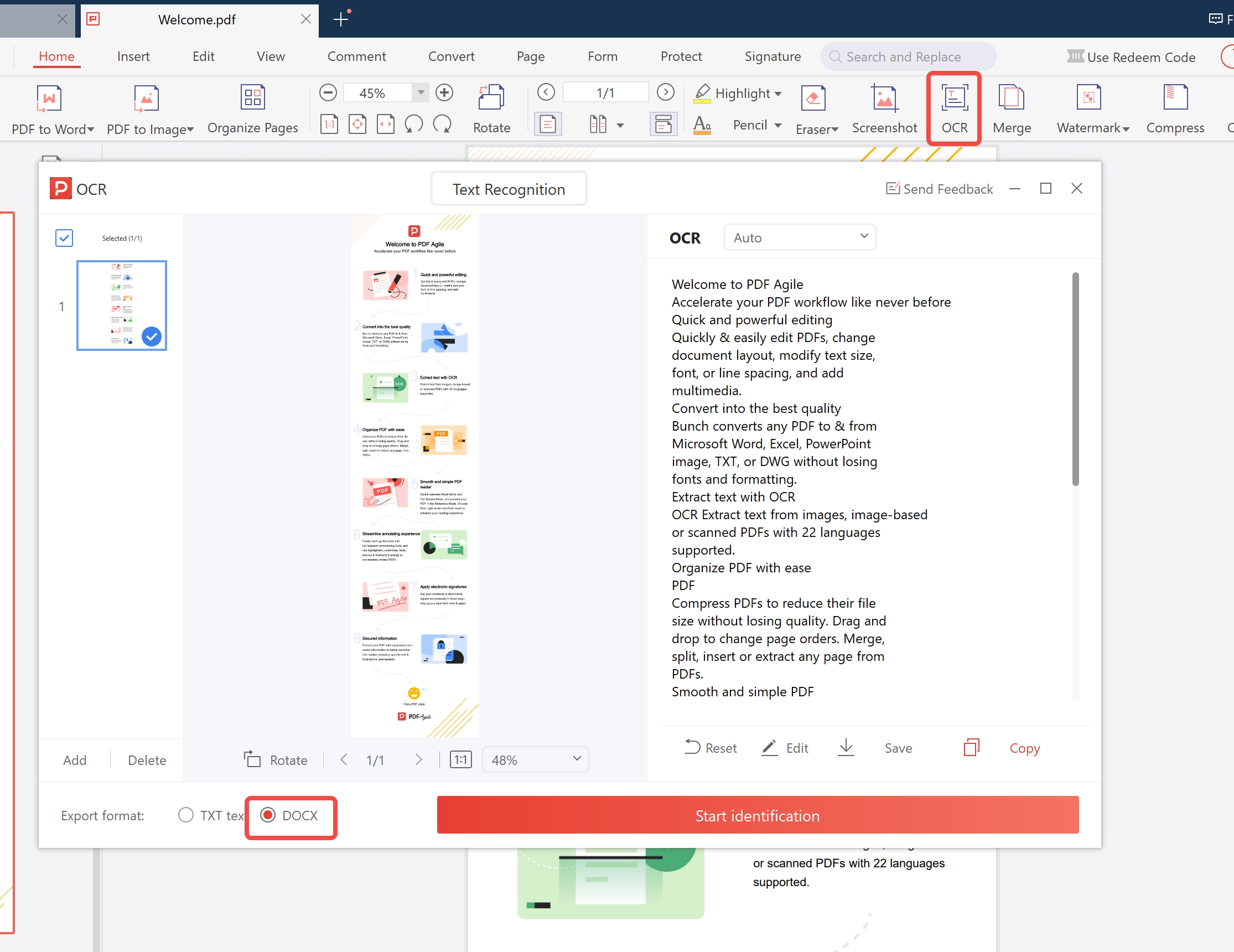
Select pages → choose output format → click Start Identification
Tips to Improve Handwriting OCR Accuracy
Write on Lined Paper When Possible
Horizontal guide lines help the recognition engine align characters correctly. Unlined paper with slanted writing is harder to process — the engine must first detect the writing baseline, which can introduce errors.
Scan at 300+ DPI
Handwriting strokes need to be clearly resolved. At 200 DPI, thin pen strokes may break or appear disconnected. 300–600 DPI provides clean, continuous strokes for the engine to analyze.
High Contrast Ink on White Background
Black or dark blue ink on white or cream paper gives the best contrast. Pencil on grey paper, or colored ink on tinted paper, requires manual contrast enhancement before processing.
Handwriting OCR vs. Standard Printed OCR
| Capability | Handwriting OCR | Standard Print OCR |
|---|---|---|
| Cursive connected letters | ✅ Yes | ❌ No |
| Printed hand-lettering | ✅ Yes | ⚠️ Partial |
| Mixed typed + handwritten page | ✅ Routes each region correctly | ❌ Fails on handwritten regions |
| Typical accuracy (clear 300 DPI scan) | ✅ 90–95% | ✅ 99%+ (printed only) |
| Built-in correction editor | ✅ Yes | ⚠️ Varies by tool |
| 100% offline processing | ✅ Yes | ✅ Yes (PDF Agile) |
Frequently Asked Questions
How accurate is handwriting OCR?
For clear, well-spaced handwriting on white paper at 300 DPI, accuracy typically reaches 90–95%. Cursive and unusual letter formations may be lower. The built-in review editor lets you quickly correct recognition errors.
Does it support non-English handwriting?
Yes. Supported handwriting languages include English, French, German, Spanish, Italian, Portuguese, and several others. Select the language before processing for best results.
Can it distinguish handwriting from printed text on the same page?
Yes. PDF Agile's region classifier detects mixed pages (e.g., a printed form with handwritten fill-ins) and routes each region to the appropriate recognition engine — printed text engine for typed content, handwriting engine for filled-in fields.
How do I correct mistakes in the handwriting recognition output?
PDF Agile includes a built-in review editor that shows recognized text alongside the original image. Click any word to correct it before exporting. For large documents, export to Word and use spell-check to catch remaining errors.
Does handwriting OCR work on smartphone photos of notes?
Yes, if the photo is sharp and well-lit. Use a document scanning app (not the standard camera app) for automatic perspective correction and contrast enhancement. Avoid angled shots — shoot directly above the paper for best results.
Can I process an entire notebook of handwritten pages at once?
Yes. Use Batch OCR mode and select Handwriting Recognition as the engine. Add your scanned notebook pages as a folder and PDF Agile processes each page in sequence, combining output into a single Word document or searchable PDF.